

Ask Andrew: Onboard networking – NMEA 2000 explained
Nov 10, 2022
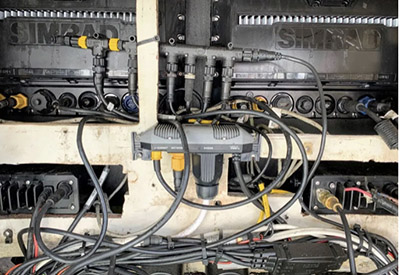
a view behind the helm showing the t-connectors linking everything together
Imagine a world where multiple touch-screens conveniently located will display information from everywhere on the vessel. Information is gathered from the engine, pumps, tanks, cameras, motors, hydraulics, winches, lights and climate control. Shallow water anchors and downriggers can be deployed via Bluetooth. Smart phones can be linked in to allow you to monitor and adjust on the go. A waypoint on a chart can be selected, and electric winches can adjust sails to bring the vessel on-course. On-board cameras and forward-facing underwater transducers can check depths, channel markers and vessel traffic to ensure that the course is adjusted appropriately.
It sounds like an episode of Star Trek.
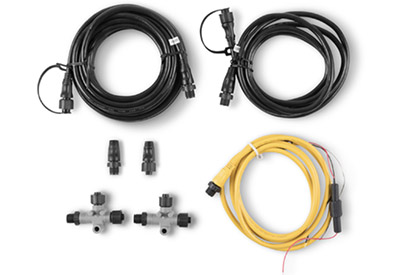 an NMEA 2000 starter pack: backbone cable, drop cable, power cable and connectors.
There’s a lot to unpack here. And for most of us, it would be a massive jump to go from our current onboard monitoring displays to the level described. Budgets, use, space and comfort-with-technology all come into play when designing a system that works.
Information has to travel from an input to a screen by way of a network. The network can be wired, wireless (Bluetooth or WIFI) or a combination.
The gold standard of marine networks is the NMEA (National Marine Electronics Association) 2000 network. This is a plug-and-play system that allows devices made by different manufacturers to communicate with each other seamlessly.
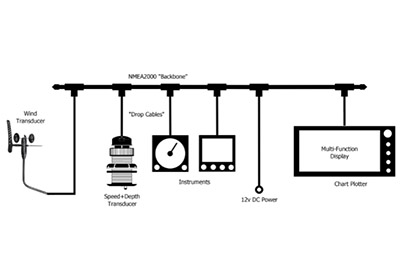 an example of how a system can be designed to allow a display to receive wind, depth and engine information simultaneously
Each instrument is connected along one central cable (called the ‘backbone’). T-connectors branch off of this backbone, and connect instruments via drop cables. The backbone serves as a central link between devices and allows each device to share information in two directions. The network is powered via 12V DC. Unlike strands of Christmas tree lights: If one device fails, or is damaged, the network still works.
Systems range from straightforward and simple to highly complex. Likely the most sought after data that boaters of all types are after is depth information. Typically, a depth transducer is connected directly by cable to a display at the helm.
This set up moves from a ‘display’ to a ‘network’ with the addition of another device. Imagine adding a second display at the helm: In order to receive depth information from the transducer at both helm and bow displays, the two will need to be networked. As a further example, the same displays can replace gauges at the helm by adding the engine to the network.
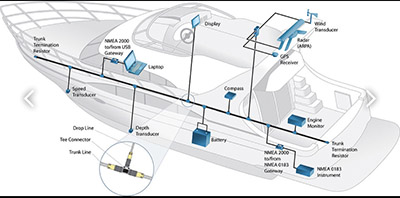 increased monitoring with a helm display monitoring internal systems and external weather and condition data
From here, more components can be added:
• Additional transducers: sonar, wind, weather
• GPS receivers
• Trolling motors
• Radar
• Additional displays
• A networking hub
• Bluetooth connectivity (phones, downriggers, shallow-water anchors)
• WIFI connectivity
• Connection to the engine – eliminating helm gauges
• System monitoring: fresh water, grey water, bilge water and fuel levels
• Battery monitoring: battery levels, charging rates, battery state
How to get started?
In many cases, an NMEA network is set up to allow older and newer devices to interact. Often, this seems daunting with with components made from different manufacturers. However, NMEA 2000 is meant to be a universal system with major manufacturers all onboard.
First: Check to confirm that the devices to be connected are all NMEA 2000 compatible. Components more than 15 years old may not NMEA 2000 ready.
Next: Confirm that the cabling and connections are plug-and-play. Sometimes, the use of secondary cables (called ‘dongles’) are needed to make connections between different cable ends (think ‘pigtail adaptors’ for shore power). Older components may need to be adapted between the older NMEA 0183 and NMEA 2000 networks.
Third: Plan the network layout, including power and t-connections
Finally: Install and secure the cabling, make the connections, and test to ensure that the displays are reading all the inputs.
NMEA 2000 is meant to be a plug-and-play, do-it-yourself system – but often requires (as all good DIY projects should) a bit of research and pre-planning. Networked and shared information can often make out boating experiences easier, more enjoyable and can save time and resources in the long run. If you’re looking for convenience, but aren’t too sure about the install, contact your friendly neighborhood marine tech for some help or advice.
 Andrew McDonald is the owner of Lakeside Marine Services – a boat repair/maintenance firm based in Toronto. Andrew has worked in the marine industry for 12 years and is a graduate of the Georgian College ‘Mechanical Techniques – Marine Engine Mechanic’ program.